



Year-End Payroll Checklist for Canadian Businesses: T4s, Benefits, Bonuses, and Compliance
Year-end payroll tasks like accurate T4 preparation, payroll reporting, and compliance are simplified with Gondaliya CPA’s step-by-step process. Our services support smooth reconciliation of payroll records while meeting all legal requirements for Canadian employers.
Quick Summary
Year-end payroll means reconciling the year’s pay, deductions, benefits, and bonuses, then issuing T4 and T4A slips and filing them with the CRA by the last day of February. Get the employee data, the taxable benefits, and the reconciliation right, and the filing is straightforward. Please start in December, not in February.
| Aspect | Details |
|---|---|
| What you file | T4 slips, the T4 Summary, and T4A slips where they apply. |
| When | By the last day of February following the calendar year. |
| How | Electronically if you file more than 5 slips of a type. |
| What must tie out | Your slips, your T4 Summary, your PD7A remittances, and your general ledger. |
Reading time: 27 minutes.
Table of Contents
- Why Year-End Payroll Matters and What It Covers
- Employee or Contractor: Classify Before You File
- Verify Your Records and Use the 2026 Limits
- The Year-End Payroll Checklist
- T4 Slips: Boxes, Benefits, Bonuses, and T4A
- Filing, Deadlines, Amendments, and Penalties
- Reconciliation, Technology, and How We Help
- Industry Spotlights: Sectors We Represent
- Glossary of Key Terms
- Frequently Asked Questions
- People Also Ask
The Numbers That Matter
This article covers Canada, with Toronto and Ontario context, and reflects CRA payroll rules and rates current to 2026 for employees outside Quebec. It assumes an incorporated business with employees completing a calendar year-end. Items marked “illustrative” are examples, not quotes, and any masked engagement notes end with “Figures changed for privacy.” This is educational information only and not tax, legal, or financial advice. Fees include HST. Please confirm your own situation and the current-year limits with a Registered CPA before acting.
Why Year-End Payroll Matters and What It Covers
The Basics
Year-end payroll matters a lot for Canadian employers. It is how you follow the tax rules and report employee earnings correctly, and the centrepiece is T4 preparation, the slip that shows each employee’s yearly income and deductions. Knowing why it matters keeps you onside with the CRA and away from penalties.
Your Core Obligations
Three things carry the year-end.
- T4 preparation: filling out the slips correctly to report income, CPP, EI, and tax deducted.
- Payroll reporting: sending the paperwork on time so both employees and the CRA are updated.
- Payroll compliance: sticking to the federal rules to avoid fines or legal trouble.
These are not just required; done well, they build trust with your team by showing that pay is clear and fair. Please treat them as one connected process rather than three separate chores.
Year-End Work Is Not a Pay Run
It helps to separate the two. Regular pay runs are about paying salaries each period. T4 preparation means gathering the yearly totals for the income reports. Knowing the difference lets you plan so the regular payments keep flowing while the year-end work happens alongside them. Set your goals early: make sure employee records are complete before the final calculations, check the benefits given during the year so the reports are correct, and aim for no differences between your internal records and the official reports. Starting these goals early makes the switch to the new accounting year easier.
| Priority task | Description |
|---|---|
| Maintain records | Keep all documents easy to find |
| Verify employee information | Double-check SINs and addresses |
| Prepare remittance statements | Collect PD7A forms ready |
Key Stat: Payroll records must be kept for at least six years after the end of the tax year they relate to. That covers slips, summaries, remittance statements, and the working papers behind them. Please store them so they can be produced quickly, not eventually.
A client treated year-end as a February task and discovered in the last week that half their employee addresses were stale. We fixed the data, but the rush was avoidable. Starting the verification in December would have made it a non-event. Figures changed for privacy.
Employee or Contractor: Classify Before You File
Classification
Before any slip is issued, confirm who is an employee and who is not. The label decides which form you file and whether source deductions were required at all.
How to Decide
To decide the worker type, look at four things:
- How much control the employer has over the work
- Who owns the tools or equipment used
- Whether the worker has a chance for profit or a risk of loss
- How the worker fits into your business operations
Employees have payroll deductions like CPP and EI taken out, and their pay shows on T4 slips. Subcontractors get reported using forms like the T5018 in construction, or sometimes a T4A slip depending on the service.
Why It Changes Everything Downstream
Getting classification wrong risks breaking tax laws. The CRA may review and reassess the taxes owed. Correct classification keeps your payroll reporting clean, because it shows taxable employment income separately from contractor fees that do not need source deductions. Please settle every classification question before you prepare a single slip.
A client paid a handful of construction subcontractors and issued them T4A slips instead of reporting on the T5018. We corrected the return type before filing. The right form follows the type of payment, not convenience. Figures changed for privacy.
Risk Warning: Issuing a T4 to someone who should have received a T4A, or the reverse, is treated as a filing error, and misclassification can leave the corporation owing the unremitted CPP, EI, and tax plus penalties. Please confirm the working relationship, not just the invoice, before choosing the slip.
A client issued T4A slips to two long-term workers who were, by every test, employees. The CRA reclassified them and the unremitted deductions came due. Testing the relationship first would have prevented the whole bill. Figures changed for privacy.
Verify Your Records and Use the 2026 Limits
The Numbers
Before you start year-end payroll, check employee details carefully, then calculate on the current-year limits. Using last year’s ceilings is one of the most common and most expensive errors.
Check the Employee Data First
Make sure names, Social Insurance Numbers, addresses, and employment status are all correct, and update any changes in marital status or tax credits, because these affect how much tax you deduct. Keep records of benefits and any taxable perks employees got during the year, and note any pension contribution updates. Check your payroll accounts with the CRA, and confirm your remitter type and how often you pay still fit your business size. Good account management helps avoid mistakes on T4 slips and lowers the chance of penalties for wrong reports or late filings.
The 2026 Limits
When calculating payroll deductions, use the current CPP maximum pensionable earnings of $74,600 and EI maximum insurable earnings of $68,900, and do not go over these when figuring each employee’s contributions. A second CPP tier, CPP2, applies at 4.00% on earnings between $74,600 and $85,000, to a maximum of $416 each. Use up-to-date tax tables for the income tax withheld, which depend on the province where your employees work, and include all taxable benefits as insurable earnings unless the CRA says otherwise. Remember the employer pays a matching CPP contribution at 5.95% up to the maximum, and both the employee and employer parts go in on your payment schedule. Mistakes here might trigger CRA audits or reassessments under the PIER program.
| Limit (2026) | Rate | Ceiling | Maximum each |
|---|---|---|---|
| CPP contributions | 5.95% | $74,600 | $4,230.45 |
| CPP2 contributions | 4.00% | $85,000 | $416.00 |
| EI premiums, employee | 1.63% | $68,900 | $1,123.07 |
| EI premiums, employer | 2.28% | $68,900 | $1,572.30 |
A client issued slips with two transposed SINs, and both employees had filing problems that took months to unwind. We amended the slips and added a SIN verification step. Checking the numbers first costs minutes. Figures changed for privacy.
Pro Tip: Verify every SIN before you issue slips. There is a separate $100 penalty for each failure to make a reasonable effort to get an employee’s SIN, and a wrong number sends the slip to the wrong taxpayer record. Please check them against your hiring file, not from memory.
A client ran the whole year on a prior-year CPP ceiling, so higher earners were under-deducted every pay. We caught it at year-end and corrected before the slips went out. A January rate update would have saved the cleanup entirely. Figures changed for privacy.
The Year-End Payroll Checklist
The Checklist
Here is the sequence that takes you from the final pay of the year to slips that tie out.
From Final Pay to Reconciliation
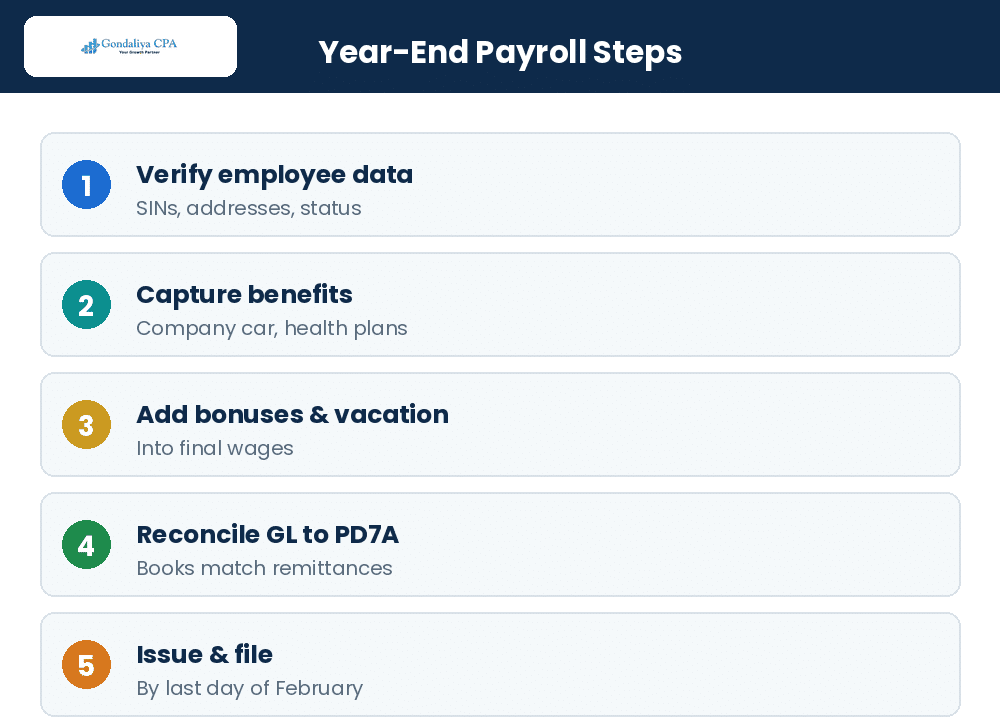
Check the final pay dates to cover the right period. Calculate unpaid bonuses and vacation pay in the final wages. Gather all PD7A remittance forms, whether monthly or quarterly summaries. Match the general ledger accounts with the PD7A totals. Prepare Records of Employment for staff who left. Following these steps helps create accurate T4 slips and reduces audit risk.
| Step | What it covers |
|---|---|
| Confirm final pay dates | The last pay of the year lands in the right period |
| Include bonuses and vacation pay | Declared unpaid bonuses and accrued vacation in final wages |
| Gather PD7A forms | All remittance statements for the year |
| Match the GL to PD7A totals | Your books agree with what you remitted |
| Prepare Records of Employment | For every employee who left during the year |
Best Practices That Prevent Rework
Avoid the common errors:
- Double-check SINs before issuing slips.
- Report all taxable benefits fully, because missing some can cost you.
- Apply CPP and EI exemptions correctly, especially if employees have multiple jobs.
- Submit PD7A reconciliations that match the GL records exactly.
- Fix mistakes quickly with amended returns after filing.
- Keep detailed notes on bonus dates versus payout timing.
- Watch the deadlines closely.
Use solid checks on your data, and please consider help from a CPA to lower the risk during a CRA review.
A client declared a bonus in December but paid it in January, then reported it in the wrong year. We corrected the timing against the payment date. Employment income belongs to the year it is paid, and noting bonus dates prevents the mix-up. Figures changed for privacy.
A client never issued Records of Employment for departing staff, and the calls started arriving in January. We prepared the outstanding ROEs and built the step into their offboarding. Handling it at departure removed the year-end scramble. Figures changed for privacy.
T4 Slips: Boxes, Benefits, Bonuses, and T4A
The Slips
The T4 slip sums up an employee’s pay and deductions for the year. Each box stands for a specific income or deduction type, and you must fill them in right to avoid trouble.
The Boxes That Matter
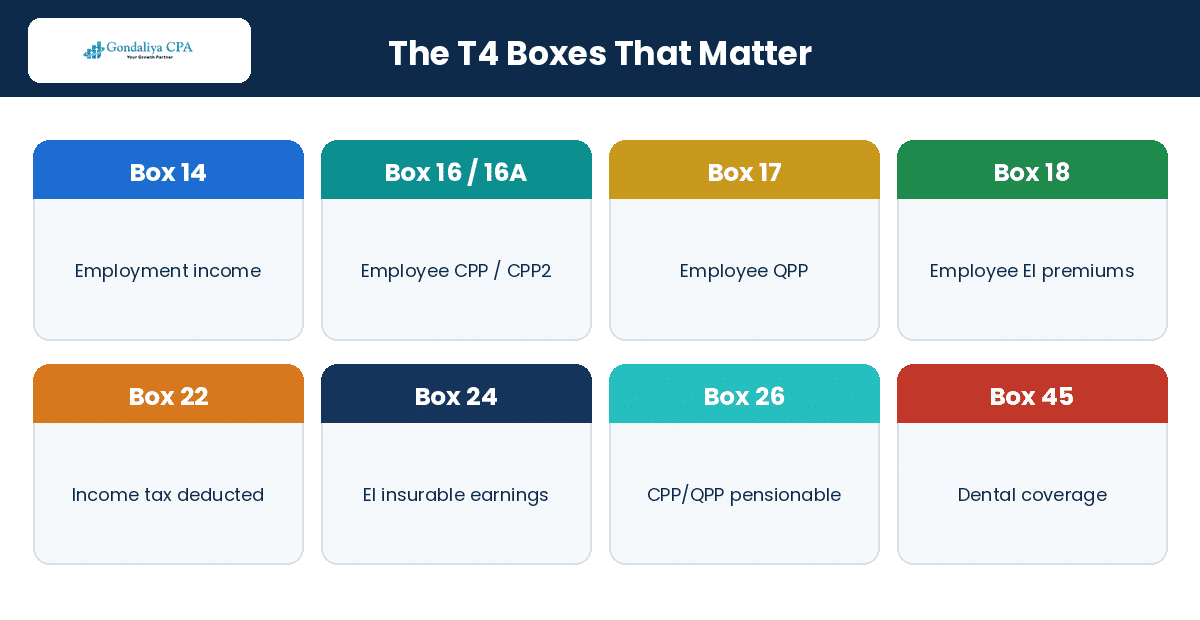
Box 14 is employment income, the total salary, wages, and bonuses before anything is taken out. Box 16 is the employee’s CPP contributions, and Box 16A carries the second CPP contributions, CPP2, where they apply. Box 17 is the employee’s QPP contributions, not the employer’s share; the employer’s CPP contributions are reported on the T4 Summary, not on the slip. Box 18 is the employee’s EI premiums withheld from pay. Box 22 is the income tax deducted for the federal and provincial governments. Box 24 is EI insurable earnings, and Box 26 is CPP or QPP pensionable earnings. Boxes 40 through 49 carry the taxable benefit codes for things like company cars or health plans, and Box 45 reports employer-offered dental coverage.
| Box | What it reports |
|---|---|
| Box 14 | Employment income: salary, wages, and bonuses |
| Box 16 / 16A | Employee’s CPP contributions / CPP2 contributions |
| Box 17 | Employee’s QPP contributions |
| Box 18 | Employee’s EI premiums |
| Box 22 | Income tax deducted |
| Box 24 | EI insurable earnings |
| Box 26 | CPP/QPP pensionable earnings |
| Box 45 | Employer-offered dental benefit coverage |
| Boxes 40 to 49 | Taxable benefit codes |
Benefits, Bonuses, and Which Slip to Use
Every employee who got paid during the year needs a T4 slip, including the taxable benefits you gave them, like the use of a company car. The amounts on all slips have to match the totals on your T4 Summary. T4 slips show employment income like salaries, bonuses, commissions, taxable benefits, and CPP and EI withheld by employers. T4A slips cover payments such as pension income, self-employed commissions, or fees paid to contractors who are not employees. Use T4 slips for people you directly employ, and T4A slips when paying consultants or subcontractors not under employment contracts. Mixing these up can cause problems in a CRA review, so check carefully what kind of payment it is. For the benefit codes, the CRA’s T4130 guide is the reference; the common ones cover company car use, housing, and gifts.
A client left a company-car benefit off the T4s entirely, understating employment income across the team. We amended the slips and rebuilt the benefit tracking. Reporting the benefit as it accrues is far cheaper than fixing it later. Figures changed for privacy.
A client assumed Box 17 was for the employer’s CPP share and kept trying to make the slip balance. Box 17 is the employee’s QPP; the employer’s share sits on the Summary. One clarification ended a recurring year-end argument. Figures changed for privacy.
Filing, Deadlines, Amendments, and Penalties
The Deadline
Filing T4 slips on time keeps your payroll compliance solid. Two methods, one deadline, and a penalty structure worth understanding before you need it.
The Deadline and the Two Methods
All Canadian employers must give employees their T4 slips and file the return by the last day of February following the calendar year, February 28 in 2026, and when that date falls on a Saturday, Sunday, or a public holiday the CRA recognizes, the return is due the next business day. You must file electronically if you file more than 5 information returns of a type for a calendar year, using CRA-certified software, Web Forms, or Internet file transfer through My Business Account. The steps are simple: collect all employee earnings and deductions, create the electronic file to CRA specifications, send it, and wait for the confirmation receipt, then check that receipt, because a confirmation of receipt does not by itself mean the return was accepted. Paper filing is allowed only if you have 5 slips or fewer: fill out the official copies and mail them with your T4 Summary. Whichever method you use, get the employee copies out and the return filed by that same deadline without fail. Also prepare the T4 Summary with the totals from all slips and the source deductions from your PD7A forms.
Amendments and Corrections
If you spot mistakes after filing, like wrong amounts, or need changes after the deadline, fix them fast. Prepare the corrected information clearly marked “Amended,” submit it electronically if your software allows or mail paper corrections citing the original details, and send new copies to the affected employees so they can fix their tax returns. Good recordkeeping helps catch mistakes early so you can fix issues before they get costly. Amended slips can be filed at any time, but correcting an error after the deadline still leaves the original shortfall exposed to penalties and interest.
What Late Filing Actually Costs
Late filing of T4 slips leads to penalties. The penalty is $100, or the amount from the CRA’s chart below, whichever is more, counted per day the failure continues up to a maximum of 100 days, and calculated separately for each type of information return. Filing on paper when you were required to file electronically brings its own penalty, starting at $125 for 6 to 50 returns of a type. Interest also builds automatically on unpaid source deductions past their due dates, even if the CRA does not send a notice, and it compounds daily until paid in full. That is why sticking to the schedule matters, especially at year-end when bonuses or retroactive pay are in play.
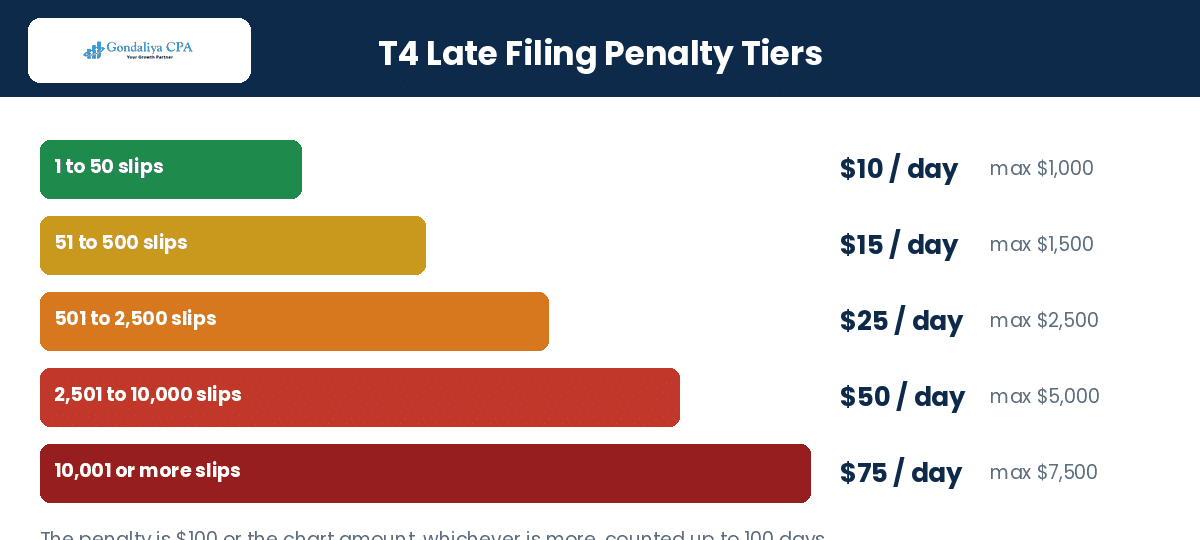
| Number of slips of a type | Penalty per day | Maximum penalty |
|---|---|---|
| 1 to 50 | $10 | $1,000 |
| 51 to 500 | $15 | $1,500 |
| 501 to 2,500 | $25 | $2,500 |
| 2,501 to 10,000 | $50 | $5,000 |
| 10,001 or more | $75 | $7,500 |
CRA Deadline: T4 and T4A slips go to employees and the CRA by the last day of February, February 28 in 2026, moving to the next business day if it lands on a weekend or holiday. Source deductions are remitted on your remitter schedule throughout the year. Please diarize both, not just the February date.
A client filed a small batch of slips on paper without realizing the electronic threshold had dropped to more than 5. The format penalty applied on top of everything else. One check of the filing method would have avoided it. Figures changed for privacy.
Reconciliation, Technology, and How We Help
Tie It Out
Payroll reconciliation is what keeps year-end reporting accurate. Technology makes it easier, and a CPA makes it certain.
Remitter Types and the PD7A
Payroll reporting is not just year-end forms; you follow remittance schedules all year. PD7A statements accompany your regular payments, showing the source deductions collected from employees, the income tax withheld plus CPP and EI amounts, and the employer portions where needed. Your remitter type depends on your average monthly withholding amount from past payments, and it sets your deadline. Late remittances cost interest and can make directors personally liable under Canadian law, and our page on a missed payroll remittance deadline covers what to do.
| Remitter type | Average monthly withholding | When to remit |
|---|---|---|
| Quarterly | Eligible small employers with a clean record | By the 15th after the quarter-end |
| Regular | Under $25,000 | By the 15th of the following month |
| Accelerated, threshold 1 | $25,000 to $99,999.99 | Twice a month |
| Accelerated, threshold 2 | $100,000 or more | Within three working days of pay |
Reconcile Monthly, Then Again at Year-End
Each month or quarter, check that what you report on the PD7A matches the money taken from paycheques, comparing your general ledger entries, payroll registers, PD7A submissions, and bank statements. Make sure CPP contributions, EI premiums, tax deductions, and taxable benefits line up with the actual payments every period. Doing regular reconciliations helps spot mistakes early so you can fix them before year-end. Then at year-end, check that the total yearly pay per employee matches the T4 slips and that the T4 Summary adds up before you send it. Look for total income matching gross pay, CPP and QPP not exceeding the maximum pensionable earnings, EI insurable earnings fitting the limits, and taxable benefits coded correctly. Cross-check your internal records against the electronic filings through My Business Account or authorized software, and compare third-party service data during this step to catch issues.
| Step | Description | Frequency |
|---|---|---|
| Compare GL vs payroll register | Make sure wages and deductions are posted right | Monthly or quarterly |
| Verify PD7A remittance amounts | Check submitted amounts match recorded ones | Each remittance due |
| Investigate variance causes | Find missing payments or data errors | Ongoing |
Software, Cloud vs Desktop, and Integration
Good payroll software auto-generates T4 slips from wage information, files electronically to the CRA, runs real-time error checks for SIN formats or missing benefit codes, and lets you track filing status through My Business Account. Cloud payroll systems update automatically with new rules and let you access data from anywhere, and they integrate with accounting apps, which makes reconciliation easier. Desktop software works where internet is slow but needs manual updates, which can leave settings outdated if forgotten, and its export formats are often proprietary rather than the standard CSV or XML cloud platforms produce. For many small incorporated businesses in Ontario, cloud options integrated with accounting workflows are simply smoother.
| Feature | Cloud-based | Desktop |
|---|---|---|
| Legislative updates | Automatic | Manual |
| Accessibility | Anywhere with internet | Local machine only |
| Data backup | Managed by the provider | Your responsibility |
| Export formats | Standardized CSV or XML | Often proprietary |
Connecting payroll to QuickBooks Online or Xero syncs pay information straight into your books without double entry, which saves time and cuts errors during monthly reconciliations and year-end checks. Auto-posting salary expenses reduces bookkeeping mistakes, CPP and EI liabilities track against the PD7A reports, and consolidated digital records leave you audit-ready. We often use Wagepoint linked to QuickBooks or Xero for clients across Toronto, Vaughan, and Mississauga, keeping records accurate while advising through each payroll step. Our monthly bookkeeping routine is what makes the year-end quick.
CRA Letters, Audits, and Internal Controls
When you get payroll letters from the CRA, act fast. They might ask for more information, point out mistakes, or remind you about year-end deadlines. Read each letter carefully and reply on time to avoid penalties or an audit, and give clear answers backed by detailed payroll records. Audits check whether you followed the rules: deductions, T4 slips, benefits, bonuses, and whether everything matches. Strong internal controls lower that risk. Divide tasks between data entry and approvals, keep audit trails of changes after pay runs, and have management approve annual reports like the T4 Summary. Reconcile the GL against the PD7A forms regularly, review bonus calculations often, train staff on benefit details yearly, and use certified software that matches the federal and provincial rules. Keeping complete business records is your best protection.
How Gondaliya CPA Helps
Gondaliya CPA is a CPA Ontario Registered Firm, with US CPA licences in Washington and Montana for cross-border needs. We handle every part of year-end payroll for incorporated SMBs across Toronto, Etobicoke, Vaughan, Mississauga, Brampton, Scarborough, Ottawa, Hamilton, Guelph, Windsor, Oshawa, and all of Canada, remotely and on a flat fee, HST included, with a one-business-day response and availability on evenings and weekends when it counts. Our phases run from data collection through payroll reconciliation, T4 preparation, filing, and a compliance review, and you receive completed T4 slips, the T4 Summary, PD7A reconciliation reports, electronic filing confirmation, and advisory notes. We handle multi-provincial payrolls with the correct rates per province and coordinate the varied remittance schedules, and we do cleanup and back-filing where historical payroll data is missing or wrong. Our consulting covers box coding, staff training on federal and provincial updates, and planning advice on pay structures. Our fees depend on employee count, payroll complexity such as bonuses and vacation, multi-provincial filings, and how much consulting support you want, and we quote the flat fee in writing after a free consultation, working in QuickBooks and Xero with Wagepoint and ADP. You can also model take-home pay with our payroll tax calculator, or compare owner pay options with our salary versus dividend calculator. If a CRA letter arrives, our payroll compliance service answers it.
Ongoing Payroll Outsourcing
You can outsource the regular payroll work too, knowing we keep watch year-round rather than only in the busy season near December:
- Auto-generated reports matching your remittance schedule
- Early alerts on problems before they become filing errors
- Support available evenings and weekends when something urgent lands
This suits busy incorporated SMB owners who want a partner across the whole payroll year, not just February. Please ask about it during the free consultation.

| Provider | Expertise | Accuracy | Compliance support | Cost |
|---|---|---|---|---|
| DIY | Low, and risky at year-end | Risky | None | Lowest |
| Non-CPA provider | Moderate | Moderate | Limited | Moderate |
| Registered CPA firm | High | Accurate | Full regulatory support | Higher |
A client’s PD7A totals never matched their general ledger, and nobody investigated until year-end, when the T4 Summary would not balance. We reconciled the year and found the variance. Monthly checks would have caught it in an hour, not a week. Figures changed for privacy.
A client ignored two CRA payroll letters over the holidays, and a routine question grew into a review. We responded, produced the records, and closed it. Answering the first letter would have kept it a five-minute matter. Figures changed for privacy.
Year-end payroll is a sequence: verify the data, classify the workers, calculate on the current-year limits, reconcile the GL to the PD7A, then issue and file by the last day of February. Do the reconciliation monthly and February becomes routine. Please start in December.
2026 Update — what is current: For 2026, CPP maximum pensionable earnings are $74,600 with CPP2 running to $85,000, and EI maximum insurable earnings are $68,900. The electronic filing threshold is more than 5 information returns of a type, down from the old 50. Box 16A carries CPP2 and Box 45 reports dental coverage. Please update your software and your assumptions together.
Our Take: The businesses that find year-end painless are the ones that reconciled every month and tracked benefits as they happened. The ones that suffer are rebuilding a year of records in February. Please make the year-end a summary of work already done.
Check Your Year-End Payroll Readiness
This quick self-check shows where your year-end stands. Please answer the six questions below.
Year-End Payroll Readiness Checker
Six quick questions to see how ready your year-end is. No fee shown.
In place:
This is a general prompt, not tax or legal advice or a quote. Your actual position depends on your records. For a real review, please book a free consultation.
Want this as a one-pager? You can download the free year-end payroll checklist and work through it before February.
Industry Spotlights: Sectors We Represent
Industry Expertise
Year-end payroll trips up different sectors in different ways. Here are ten we handle often, and the year-end issue that matters most in each.
| Industry | The Year-End Issue |
|---|---|
| Medical doctors & physician professional corporations | Taxable benefits on the owner’s T4 |
| Dentists & dental practices | Associate payments: T4 or T4A |
| Daycare, childcare & CWELCC services | Grant-funded wages reconciled to the T4s |
| Real estate investors, landlords & holding companies | Owner remuneration reported correctly |
| Property developers & builders | T5018 subcontractor reporting alongside T4s |
| Construction, contractors & skilled trades | Subcontractor slips and worker classification |
| Technology startups & SaaS | Bonus timing and benefit coding |
| E-commerce & online retailers | Seasonal staff Records of Employment |
| Restaurants & food and beverage | Tips reporting and high-turnover ROEs |
| Transportation, logistics & trucking | A separate T4 per province worked |
- Medical doctors & physician professional corporations: The year-end issue is coding taxable benefits on the owner’s T4, things like a vehicle or insurance that are easy to overlook. Specialists certified through the Royal College of Physicians and Surgeons of Canada face the same coding as any incorporated employer.
- Dentists & dental practices: Practices regulated by the Royal College of Dental Surgeons of Ontario must decide whether associates take a T4 or a T4A, and the answer follows the working relationship.
- Daycare, childcare & CWELCC services: Grant-funded wages have to reconcile to the T4s and the remittances, so the funder and the CRA see the same numbers.
- Real estate investors, landlords & holding companies: With small payrolls, the year-end question is whether owner remuneration was reported correctly on the slip.
- Property developers & builders: T5018 subcontractor reporting runs alongside the T4s, and both have to be right.
- Construction, general contractors & skilled trades: For electricians, plumbers, and HVAC firms, the year-end exposes any classification shortcut taken during the year, since the slip type follows the relationship.
- Technology startups & SaaS: Bonus timing and benefit coding are the recurring year-end questions as compensation gets more creative.
- E-commerce & online retailers: Seasonal staff mean a stack of Records of Employment, and they are best issued at departure rather than in February.
- Restaurants & food and beverage: Tips reporting and high-turnover ROEs make this the sector where year-end data quality matters most.
- Transportation, logistics & trucking: If a driver worked in more than one province or territory during the year, a separate T4 slip is required for each one.
A trucking client issued one T4 per driver despite work across several provinces. We reissued a slip per province and corrected the withholding basis. Multi-province payroll needs the split at year-end, not a single slip. Figures changed for privacy.
A restaurant client never reported tips consistently, so the T4s understated income and the ROEs were incomplete. We built tip reporting into the pay cycle. Year-end became a summary rather than a reconstruction. Figures changed for privacy.
A childcare client’s grant-funded wages did not reconcile to their T4 totals, which the funder queried. We aligned the wage records, the slips, and the remittances. One reconciliation satisfied both the funder and the CRA. Figures changed for privacy.
Glossary of Key Terms
Plain-English Definitions
- T4 slip: The Statement of Remuneration Paid, reporting an employee’s yearly income and deductions.
- T4 Summary: The form totalling all your T4 slips and source deductions for the year.
- T4A slip: The slip for pension income, self-employed commissions, and fees to non-employees.
- T5018: The information return for payments to subcontractors in construction.
- PD7A: The statement of account accompanying your source deduction remittances.
- Source deductions: The CPP, EI, and income tax withheld and remitted to the CRA.
- Remitter type: The category, based on average monthly withholding, that sets how often you remit.
- Taxable benefit: A non-cash perk, like a company car, that counts as income on the T4.
- Record of Employment: The form issued when an employee stops working for you.
- PIER: The Pensionable and Insurable Earnings Review, where the CRA checks your CPP and EI against the slips.
- Cleanup or back-filing: Correcting missing or inaccurate historical payroll data before final filings.
- Amended slip: A corrected slip marked “Amended” and refiled after an error is found.
Frequently Asked Questions
FAQ
When are T4 slips due?+
By the last day of February following the calendar year, February 28 in 2026, moving to the next business day if it falls on a weekend or holiday.
What are the late filing penalties for T4 slips?+
$100 or the CRA’s chart amount, whichever is more: for 1 to 50 slips it is $10 per day to a maximum of $1,000, rising with the slip count to $7,500, counted up to 100 days.
Do I have to file electronically?+
Yes, if you file more than 5 information returns of a type for the year. Paper filing is only allowed at 5 slips or fewer, and filing on paper when you should not brings a penalty starting at $125.
What is the difference between Box 16 and Box 17?+
Box 16 is the employee’s CPP contributions and Box 17 is the employee’s QPP contributions. The employer’s CPP share is reported on the T4 Summary, not on the slip, and Box 16A carries CPP2.
When must I register a payroll account with the CRA?+
Before you pay your first employee. Register as soon as you know you are hiring, so the deductions have somewhere to go.
What is the PD7A remittance schedule?+
It depends on your remitter type: regular remitters pay by the 15th of the following month, accelerated threshold 1 remits twice a month, and threshold 2 within three working days of the pay.
What are the key taxable benefit codes for T4 slips?+
Use the CRA’s T4130 guide to report taxable benefits correctly. Common ones include company car use, housing, and gifts.
How do you handle bonuses, vacation pay, and retroactive pay?+
We make sure declared unpaid bonuses, vacation pay, and retroactive pay are accurately included in the T4 slips and the payroll reconciliations, reported in the year they are paid.
How long must payroll records be kept?+
At least six years after the end of the tax year they relate to.
What does year-end payroll service cost?+
A flat fee, HST included, set by employee count, payroll complexity, multi-provincial filings, and consulting support, quoted after a free consultation.
What phases are involved in your year-end payroll process?+
Data collection, payroll reconciliation, T4 preparation, filing, and a compliance review, using specialized payroll and filing tools throughout.
What deliverables do clients receive?+
Completed T4 slips, the T4 Summary, PD7A reconciliation reports, electronic filing confirmation, and advisory notes.
How do DIY, non-CPA, and CPA payroll providers compare?+
DIY is lowest cost with low expertise and no compliance support. Non-CPA providers sit in the middle on expertise, accuracy, and support. A Registered CPA firm brings high expertise, accurate filings, and full regulatory support at a higher fee.
How do you manage multi-provincial payrolls?+
We apply the correct tax rates for each province, handle the varied remittance schedules, and prepare compliant multi-jurisdictional reports, including a separate T4 slip per province worked.
What is cleanup or back-filing in year-end payroll?+
It is correcting missing or inaccurate historical payroll data so the records are complete before the final filings go in.
Year-End Payroll Checklist
- Verify every employee’s name, SIN, address, and status before final calculations.
- Confirm all taxable benefits are tracked and coded, including company vehicles.
- Include declared unpaid bonuses and accrued vacation pay in final wages.
- Calculate on the 2026 limits: CPP to $74,600, CPP2 to $85,000, EI to $68,900.
- Reconcile the general ledger against every PD7A remittance for the year.
- Issue Records of Employment for everyone who left during the year.
- Prepare the T4 slips and T4 Summary so totals tie to the remittances.
- File and distribute by the last day of February, electronically if more than 5 slips.
Key Points on Year-End Payroll Management
- Bonuses and vacation pay: include declared unpaid bonuses and accrued vacation pay in final wages before preparing T4s.
- Taxable benefit codes: use the CRA’s T4130 guide to classify every benefit correctly on the slips.
- Payroll account registration: register with the CRA before you pay your first employee, so the deductions have somewhere to go.
- PD7A remittance deadlines: know your remitter type and follow the correct monthly or accelerated deadlines strictly.
- Late filing penalties: each late information return attracts a daily penalty on the CRA’s tiered chart, so timely filing saves real money.
- Provider choice: weigh DIY, non-CPA, and CPA expertise and support against your budget and compliance needs.
- Our process: detailed workflows carry the file from data intake through to CRA submission.
- Deliverables: a complete forms package plus detailed reconciliations supporting audit readiness.
- Cost drivers: employee numbers, provincial complexity, and bonus or vacation inclusion all shape the fee.
- Multi-provincial payrolls: calculations adjust for provincial differences and multiple reporting deadlines are coordinated.
- Cleanup and back-filing: fixing incomplete or incorrect past-year payroll data before the official filings.
- Record retention: six years minimum protects the business during any audit or review.
Who This Is For / Not For
- For: Incorporated Canadian businesses with employees closing out a calendar year.
- Not For: A corporation with no employees and no slips to issue.
People Also Ask
Quick Answers
Can I fix a T4 after I have filed it?+
Yes. Prepare the slip marked “Amended,” refile it, and send new copies to the employee, though penalties on the original shortfall may still apply.
What happens if I miss the February deadline?+
Penalties apply per type of information return, and interest compounds daily on any unpaid source deductions until it is paid.
Do I need a T4 for an employee who worked in two provinces?+
Yes. Fill out a separate T4 slip for each province or territory the employee worked in during the year.
Contact Gondaliya CPA at 647-212-9559 or info@gondaliyacpa.ca for expert help with your year-end payroll, T4 preparation, and full compliance.
Get your year-end payroll filed right
Gondaliya CPA handles data collection, reconciliation, T4 preparation, filing, and the compliance review, all on a flat fee, HST included, with a one-business-day response. Please book a free consultation before February arrives.
Next Steps
Year-end tasks go beyond issuing papers. They demand accurate information returns, on-time distribution that avoids heavy fines, reconciliation that makes the numbers match the remittances, and fast responses when a letter or a review arrives. Please review how you currently handle these steps, then bring in help that reduces the admin burden while raising your confidence about following Canada’s employment tax rules. Reach out for a free consultation, call 647-212-9559, or email info@gondaliyacpa.ca. If our content helps, please add gondaliyacpa.ca as a preferred source on Google.
Published: July 6, 2026 · Last updated: August 12, 2026
Disclaimer: This article is educational information only and is not tax, legal, or financial advice. It reflects CRA payroll rules and limits current to 2026 for employees outside Quebec, including CPP maximum pensionable earnings of $74,600, CPP2 to $85,000, EI maximum insurable earnings of $68,900, the last-day-of-February T4 and T4A deadline, and the electronic filing threshold of more than 5 information returns of a type. Limits change annually and outcomes depend on your specific facts. Please consult a Registered CPA in Canada or Ontario before acting. Fees include HST.

Sharad Gondaliya is a CPA Canada & CPA USA with 15 Years+ experience of Accounting, Tax, Payroll of Corporate Small Businesses as Tax Accountant. He is a CPA Ontario member (61040184) and holds US CPA licences in Washington and Montana and is well known among corporate small businesses for tax planning, efficient tax solutions, and affordable CPA services. Sharad is the Principal (Director) of Gondaliya CPA – Affordable CPA Firm in Canada. Licenses: CPA Ontario: 61040184 | CPA USA (MT): PAC-CPAP-LIC-033176 | CPA USA (WA): 57629 | CPA Firm License: 61330051 View Full Author Bio