



How to Set Up Payroll for a New Corporation in Canada: A Complete Guide for Business Owners
Setting up payroll in Canada for your incorporated business requires proper corporation payroll registration, including a CRA payroll account to manage CPP, EI, and income tax deductions correctly. Gondaliya CPA offers guidance on payroll remittance requirements, payroll for small business Canada, and how to avoid the common payroll mistakes new business owners make.
Quick Summary
Setting up payroll for a new corporation means registering a CRA payroll account under your Business Number, then deducting CPP, EI, and income tax correctly, remitting on time, and filing T4 and T4A slips by the end of February. Get the registration and the 2026 rates right first, and the rest follows. Please register before you pay your first employee.
| Aspect | Details |
|---|---|
| What you register | An RP payroll account under your Business Number. |
| What you deduct | CPP, EI, and income tax each pay period. |
| When you remit | On the schedule the CRA sets for your payroll size. |
| What you file | T4 and T4A slips by the last day of February. |
Reading time: 27 minutes.
Table of Contents
- What a Payroll Account Is and Why It Matters
- Who Must Register, and Worker Classification
- The Key Deductions: CPP, EI, and Income Tax
- Before You Register: Documents and TD1 Forms
- Registering the Payroll Account with the CRA
- Managing Payroll After Registration
- Compliance, Deadlines, and Getting Help
- Industry Spotlights: Sectors We Represent
- Glossary of Key Terms
- Frequently Asked Questions
- People Also Ask
The 2026 Numbers at a Glance
This article covers Canada, with Toronto and Ontario context, and reflects CRA payroll rules and rates current to 2026 for employees outside Quebec. It assumes an incorporated business with employees. Items marked “illustrative” are examples, not quotes, and any masked engagement notes end with “Figures changed for privacy.” This is educational information only and not tax, legal, or financial advice. Fees include HST. Please confirm your own situation and the current-year rates with a Registered CPA before acting.
What a Payroll Account Is and Why It Matters
The Basics
A payroll account is a CRA account that lets an employer manage payroll deductions, income tax, CPP contributions, and EI premiums, and remit them properly. Any corporation with employees needs one, and registering it keeps you onside with federal rules and out of penalty territory.
Why an Incorporated Business Needs One
When you register, the account attaches to your Business Number and links all your payroll activity in one place. With it set up, a corporation can pay employees on time, calculate CPP and EI correctly, and keep clean records for a CRA review. Skipping the step risks fines or worse, and getting it right also builds trust with your team that their pay and deductions are handled properly. Please treat registration as the first task, not an afterthought.
A client quoted the wrong RP account number on their first remittances, and the payments went unmatched. We corrected the number and the CRA reallocated them. One accurate identifier saved weeks of confusion. Figures changed for privacy.
Key Stat: The account attaches to your nine-digit Business Number with an RP suffix, so a payroll account looks like 123456789 RP0001. That number goes on every remittance and every letter about employee deductions. Please quote it exactly.
A new corporation paid its first two employees before registering, then scrambled when the deductions had nowhere to go. We registered the account and back-filled the remittances before a penalty landed. Registering first would have avoided the rush. Figures changed for privacy.
Who Must Register, and Worker Classification
Who and What
If your incorporated business plans to hire, register the payroll account before paying wages or withholding tax. And before payroll even runs, classify each worker correctly, because the label decides the obligations.
When to Register
Register when you hire your first employee, when you move from self-employment into formal payroll, or when you grow and add staff. Doing it early avoids salary delays and keeps you compliant from the first cheque.
Employee or Contractor
Calling an employee a contractor can cost you back taxes and penalties. To classify correctly, weigh control over hours and how the work is done, who provides the tools, the worker’s independence, and who carries the financial risk. Getting it right protects the business and treats the worker fairly for the role they actually fill.
A client hired their first employee and started paying wages weeks before registering the payroll account. We registered it and brought the deductions current before a deadline was missed. Registering first would have made it seamless. Figures changed for privacy.
Risk Warning: Misclassifying an employee as a contractor is one of the CRA’s sharpest payroll flags, and for 2026 the checks on classification are stronger. If the CRA reclassifies the worker, the unremitted CPP, EI, and tax, plus penalties, land on the corporation. Please classify carefully before the first payment.
A client paid a long-term worker as a contractor to keep things simple, but the working relationship was clearly employment. We corrected the classification and set up proper payroll before a review. Fixing it early avoided a much larger bill. Figures changed for privacy.
The Key Deductions: CPP, EI, and Income Tax
The Rates
Three deductions come off every eligible paycheque: CPP, EI, and income tax. Using the current 2026 rates is what keeps the numbers right.
CPP, EI, and Income Tax for 2026
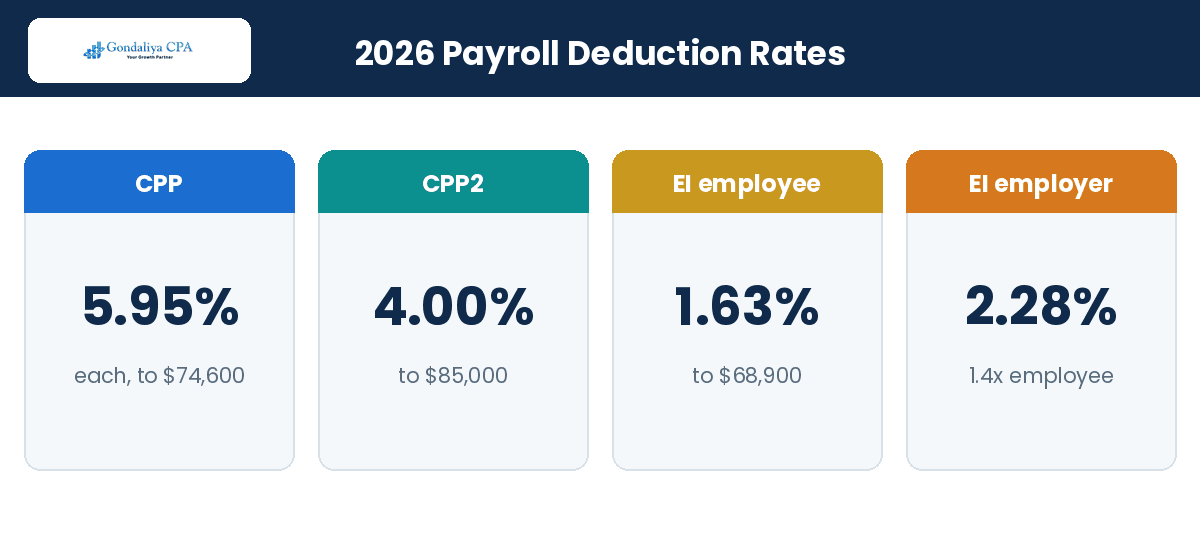
For 2026, CPP is 5.95% for both employer and employee on earnings between the $3,500 basic exemption and the $74,600 ceiling, for a maximum contribution of $4,230.45 each. A second tier, CPP2, adds 4.00% on earnings between $74,600 and $85,000, up to $416 each. EI for 2026 is 1.63% for the employee on insurable earnings up to $68,900, a maximum of $1,123.07, while the employer pays 1.4 times the employee premium, so 2.28%, up to $1,572.30. Income tax is withheld using the federal and Ontario deduction tables based on the employee’s pay and TD1 credits. Please deduct the employer’s share as well, not just the employee’s.
| Deduction (2026) | Rate | Ceiling | Maximum |
|---|---|---|---|
| CPP (each) | 5.95% | $74,600 | $4,230.45 |
| CPP2 (each) | 4.00% | $85,000 | $416.00 |
| EI employee | 1.63% | $68,900 | $1,123.07 |
| EI employer | 2.28% | $68,900 | $1,572.30 |
A client used an employer EI rate equal to the employee rate, under-remitting the employer share all year. We corrected it to 1.4 times and trued up the account. The right multiplier fixed the shortfall. Figures changed for privacy.
Pro Tip: Do not carry last year’s rates into January. The CPP ceiling, the CPP2 band, and the EI maximum all move each year, and using a stale rate quietly under- or over-deducts all year. Please update your tables or software at the start of every year.
A Numeric Walkthrough
For an employee earning $50,000 a year in Ontario in 2026, CPP is 5.95% on the $46,500 above the $3,500 exemption, or $2,766.75, and the employer matches it. EI is 1.63% of the $50,000, or $815.00, and the employer pays 1.4 times that, or $1,141.00. There is no CPP2 because the salary is below $74,600. Income tax is then withheld per the tables and the employee’s TD1.
| $50,000 salary (2026) | Employee | Employer |
|---|---|---|
| CPP (5.95% on $46,500) | $2,766.75 | $2,766.75 |
| EI (employee 1.63%; employer 1.4x) | $815.00 | $1,141.00 |
| CPP2 (none below $74,600) | $0.00 | $0.00 |
| Income tax | Per TD1 & tables | Not applicable |
A client ran January payroll on the prior year’s CPP ceiling and under-deducted on higher earners for months. We caught it in a review and corrected the deductions before year-end. A start-of-year rate update would have prevented it. Figures changed for privacy.
Before You Register: Documents and TD1 Forms
Get Ready
Gather a short list of information before you register, and collect a TD1 from every employee, so the deductions start correct.
What to Have Ready
Have your nine-digit Business Number, your legal business name, registered address, and contact details on hand. Each employee must give their Social Insurance Number so income and deductions are reported to the right person. Having it all ready makes registration faster and avoids errors.
| Required Information | Description |
|---|---|
| Business Number (BN) | The 9-digit identifier from the CRA |
| Legal business name | The official registered name of the corporation |
| Registered address | The location used for official correspondence |
| Contact details | Phone number and email |
| Employee SINs | A unique identifier required for each employee |
TD1 Forms Set the Withholding
TD1 forms tell you how much tax to withhold based on each employee’s personal credits. Collect both the federal and the provincial TD1 before paying anyone, and collect fresh ones each year or whenever an employee’s situation changes, such as marriage. Accurate TD1s keep the income-tax deduction right all year.
A client never collected provincial TD1s, so Ontario withholding was off for every employee. We gathered the forms and corrected the tables during setup. Complete TD1s fixed the withholding immediately. Figures changed for privacy.
Registering the Payroll Account with the CRA
Registration
Registering the payroll account is what lets you send CPP, EI, and income tax to the CRA the right way. There is more than one route.
Register Online, or Get Help
The simplest route is the CRA’s Business Registration Online service: enter your corporation’s legal name, address, and incorporation number, choose “Payroll” as a program account, and you receive your Business Number with the RP payroll suffix. In the format 123456789 RP0001, the RP marks the payroll program and the last four digits identify the specific account. If you would rather not register online, call us at 647-212-9559 or email info@gondaliyacpa.ca and we will set it up for you. A non-resident business paying employees in Canada registers differently, using Form RC1 to request a Business Number.
| Method | Ease of use | Speed | Support available |
|---|---|---|---|
| Online registration | Easy | Immediate | Limited, online help only |
| Phone registration | Moderate | Same day | CRA support |
| Through Gondaliya CPA | Very easy | Fast | Expert guidance throughout |
When You Need a Separate Account
A corporation running distinct activities may need separate payroll accounts, for example when divisions need their own reports or schedules. Consider a separate or changed account when you add branches or locations with employees, when ownership changes in a way that affects responsibilities, or when you begin operating under different provincial rules. Tell the CRA promptly whenever you change or close an account, because waiting causes late payments or wrong filings, and keep clear records for each account to make any audit easier.
A client opened a second location and kept everything on one payroll account until the reporting became a tangle. We set up a separate account so each location reported cleanly. The split made both compliance and bookkeeping simpler. Figures changed for privacy.
Managing Payroll After Registration
Ongoing Work
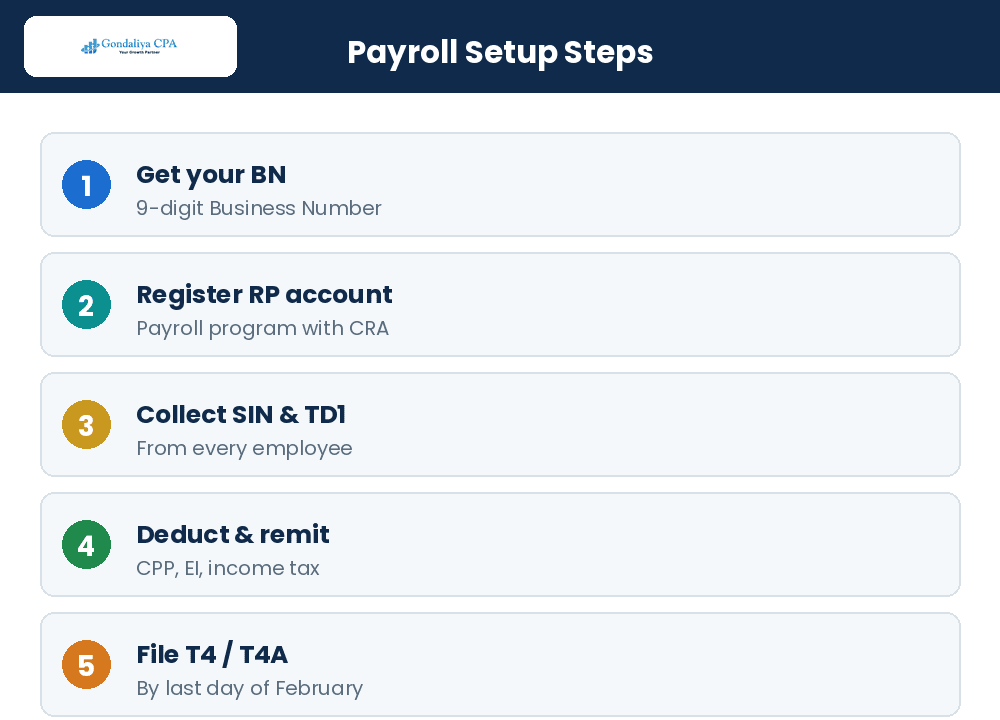
Once the account is live, the routine is calculate, remit, and file, every pay period and every year, on the CRA’s schedule.
Calculate and Remit on Time
Each pay period, calculate CPP at the 2026 rate, EI, and income tax from each employee’s details, then send those amounts plus the employer’s share to the CRA by your deadline. Your remitter type sets that deadline: most new and small employers are regular remitters, paying by the 15th of the following month, while larger payrolls remit more often. Good software using the government tables keeps the math right and the payments on time.
| Remitter type | Typical payroll size | When to remit |
|---|---|---|
| Regular | New and small employers | By the 15th of the following month |
| Quarterly | Eligible small employers with a clean record | By the 15th after the quarter-end |
| Accelerated, threshold 1 | Larger monthly withholding | Up to twice a month |
| Accelerated, threshold 2 | The largest payrolls | Within three working days of pay |
File the Slips and Update Your Details
Each year, file the T4 and T4A information returns showing total pay and deductions, and give employees their slips, all by the last day of February, so they can file on time. Keep clean records of hours, wages, benefits, and deductions all year to make filing simple. And whenever your business details change, a new address, an ownership change, updated contacts, or the end of employment, tell the CRA promptly, and close the account only after everything owing is paid.
A client was a regular remitter but treated the deadline as month-end instead of the 15th, so payments were routinely late. We reset the reminders to the correct date and the late charges stopped. Knowing the remitter type fixed it. Figures changed for privacy.
CRA Deadline: T4 and T4A slips are due to employees and the CRA by the last day of February, February 28 in 2026. Source deductions are remitted on your remitter schedule, and taxable benefits like a company vehicle or a health plan must be reported on the T4. Please diarize each of these dates.
A client forgot to report a company-car benefit on the T4s, understating employment income. We amended the slips and corrected the records before the CRA followed up. Catching the taxable benefit early kept it a small fix. Figures changed for privacy.
Compliance, Deadlines, and Getting Help
Stay Compliant
Compliance is mostly about hitting the remittance deadlines, answering the CRA promptly, and using good tools, or a CPA, to keep it all straight.
Deadlines and the Penalties for Missing Them
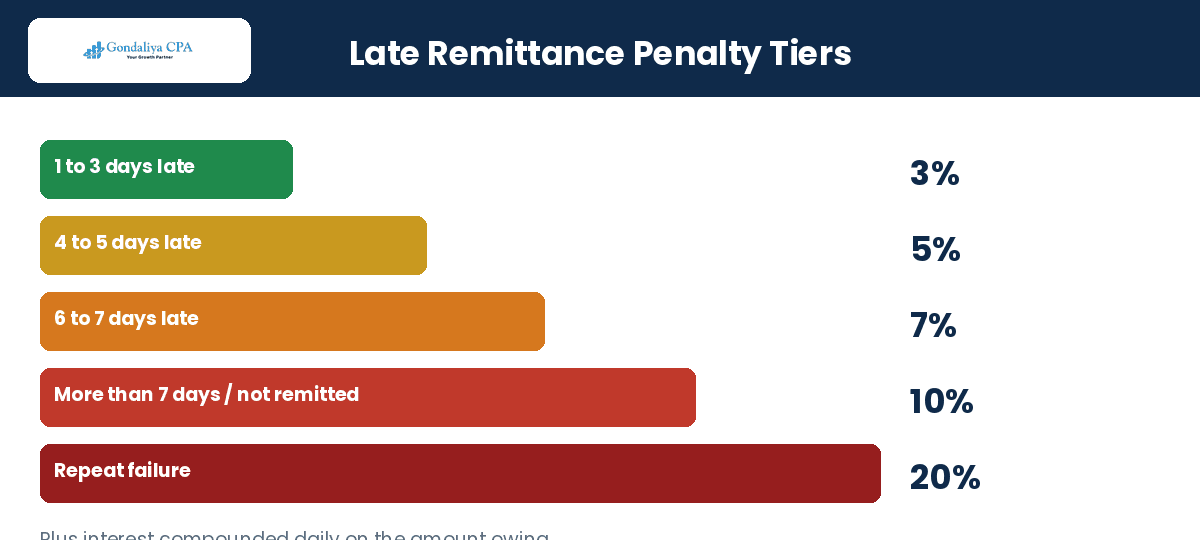
You hold the CPP, EI, and income tax you deduct until you remit it, so these are trust amounts the CRA pursues hard. Miss a remittance and the penalty rises with the delay: 3% for one to three days late, 5% for four or five, 7% for six or seven, and 10% once it is more than seven days late or not remitted at all, with 20% for a repeat failure, and interest compounds daily on top. Our page on a missed payroll remittance deadline walks through what to do.
| How late | Penalty |
|---|---|
| 1 to 3 days | 3% |
| 4 to 5 days | 5% |
| 6 to 7 days | 7% |
| More than 7 days or not remitted | 10% |
| Repeat failure | 20% |
Common Mistakes New Owners Make, and How to Avoid Them
New owners tend to trip on the same four things: forgetting to register the CRA payroll account on time, using last year’s CPP, EI, or tax rates by mistake, paying remittances late, and skipping the record keeping the CRA expects. Each one is avoidable with a little setup discipline.
| Mistake | Prevention |
|---|---|
| Missing payroll account deadlines | Register early, before hiring |
| Using outdated deduction rates | Update rates every January from the CRA |
| Late remittances | Set payment reminders tied to your remitter schedule |
| Poor record keeping | Use accounting software, or a CPA service |
Answer the CRA and Use the Right Tools
The CRA watches payroll accounts and runs audits on deductions, timing, and T4 filing, so answer any letter about a missed payment or a document request quickly, before it grows into a fine. Keeping accurate wage and deduction records is your best protection. Good software, QuickBooks or Xero with Wagepoint or ADP, automates the calculations and files the slips electronically, and a CPA who knows payroll compliance and remittances keeps the whole thing on track.
How Gondaliya CPA Helps
Gondaliya CPA is a CPA Ontario Registered Firm, with US CPA licences in Washington and Montana for cross-border needs. We provide corporation payroll setup and ongoing payroll for incorporated SMBs across Toronto, Etobicoke, Vaughan, Mississauga, Brampton, Scarborough, Ottawa, Oshawa, Guelph, Hamilton, North York, Windsor, and all of Canada, remotely and on a flat fee, HST included, with a one-business-day response. We register your account, set the deductions, remit on time, file your slips, and answer the CRA, working in QuickBooks and Xero with Wagepoint and ADP. You can also model take-home pay with our payroll tax calculator.
A client missed a remittance by a week and was surprised how fast the penalty and daily interest added up. We brought the account current and set reminders tied to the CRA schedule. The missed deadline never repeated. Figures changed for privacy.
A client ignored two CRA payroll letters, and a small issue grew into a larger one. We responded, supplied the records, and settled it quickly. Answering the first letter would have kept it minor. Figures changed for privacy.
Payroll setup is a sequence: register, classify, deduct at the current rates, remit on time, and file the slips by the end of February. Get the registration and the 2026 rates right and the rest is routine. Please start with a free consultation if any step is unclear.
2026 Update — what is current: For 2026, CPP is 5.95% each to a $74,600 ceiling, CPP2 adds 4.00% to $85,000, EI is 1.63% for employees to $68,900 with the employer at 1.4 times, and T4 and T4A slips are due the last day of February. Classification checks are stronger this year. Please run payroll on the current-year figures.
Our Take: The two mistakes that cost new corporations the most are registering late and running on last year’s rates. Fix both, and payroll stops being stressful. Please set it up correctly once rather than repairing it later.
Check Your Payroll Setup Readiness
This quick self-check shows where your payroll setup stands. Please answer the six questions below.
Corporation Payroll Setup Readiness Checker
Six quick questions to see how ready your payroll is. No fee shown.
In place:
This is a general prompt, not tax or legal advice or a quote. Your actual position depends on your records. For a real review, please book a free consultation.
Want this as a one-pager? You can download the free corporation payroll setup checklist and work through it before your first payroll. You can also compare owner pay options with our salary versus dividend calculator.
Industry Spotlights: Sectors We Represent
Industry Expertise
Payroll needs shift by industry, and knowing your sector’s usual challenge makes setup smoother. Here are ten we handle often, and the payroll focus for each.
| Industry | The Payroll Focus |
|---|---|
| Medical doctors & physician professional corporations | Owner remuneration and staff payroll |
| Dentists & dental practices | Hygienist and assistant payroll; benefits |
| Daycare, childcare & CWELCC services | Grant-funded wages reconciled to payroll |
| Real estate investors, landlords & holding companies | Small payrolls and owner pay decisions |
| Property developers & builders | Site staff payroll across projects |
| Construction, contractors & skilled trades | Employee vs subcontractor classification |
| Technology startups & SaaS | Rapid hiring and benefit reporting |
| E-commerce & online retailers | Seasonal staff and variable hours |
| Restaurants & food and beverage | Tips, hourly wages, and turnover |
| Transportation, logistics & trucking | Driver payroll and worker classification |
- Medical doctors & physician professional corporations: The payroll focus is balancing owner remuneration with staff payroll, so both the corporation and the team are handled correctly. Specialists certified through the Royal College of Physicians and Surgeons of Canada often weigh salary against dividends for the owner.
- Dentists & dental practices: Practices regulated by the Royal College of Dental Surgeons of Ontario run payroll for hygienists and assistants, where benefit reporting needs care.
- Daycare, childcare & CWELCC services: The focus is reconciling grant-funded wages to payroll so both the funding and the remittances stay accurate.
- Real estate investors, landlords & holding companies: Small payrolls and owner pay decisions are the areas where setup most needs care.
- Property developers & builders: Site staff payroll across multiple projects is the focus, so costs and remittances stay clear by build.
- Construction, general contractors & skilled trades: For electricians, plumbers, and HVAC firms, the recurring question is employee versus subcontractor classification, which the setup must get right.
- Technology startups & SaaS: Rapid hiring and accurate benefit reporting are the payroll priorities as the team grows.
- E-commerce & online retailers: Seasonal staff and variable hours are the areas where payroll setup pays off most.
- Restaurants & food and beverage: Tips, hourly wages, and high turnover make accurate, current payroll essential.
- Transportation, logistics & trucking: Driver payroll and correct worker classification are the focus before the first cheque.
A trades client had paid several drivers as subcontractors, and a review reclassified them as employees. We set up proper payroll and back-filed the remittances. Getting classification right from the start would have avoided the penalties. Figures changed for privacy.
A restaurant client never reported tips consistently, so the T4s were understated. We built tip reporting into the payroll routine. The corrected slips kept the CRA satisfied and the staff filings accurate. Figures changed for privacy.
A childcare client’s grant-funded wages were never reconciled to the payroll remittances. We aligned them so both matched each pay period. The reconciliation kept the funding reporting clean. Figures changed for privacy.
Glossary of Key Terms
Plain-English Definitions
- Payroll account: The CRA account, an RP program under your Business Number, used to remit deductions.
- Business Number: The nine-digit identifier the CRA assigns to a business.
- CPP: Canada Pension Plan contributions, 5.95% each in 2026 to the $74,600 ceiling.
- CPP2: The second CPP tier, 4.00% each on earnings between $74,600 and $85,000.
- EI: Employment Insurance premiums, 1.63% for employees in 2026; the employer pays 1.4 times.
- Income tax withholding: Federal and provincial tax deducted from pay using the CRA tables.
- TD1 form: The form declaring personal tax credits that set the withholding amount.
- Source deductions: The CPP, EI, and tax withheld and remitted to the CRA.
- Remitter type: The category that sets how often you remit, based on payroll size.
- T4 slip: The annual statement of employment income and deductions.
- T4A slip: The annual statement for certain other payments, such as some subcontractors.
- Taxable benefit: A non-cash perk, like a company car, that counts as income on the T4.
Frequently Asked Questions
FAQ
When must I register a payroll account?+
Before you pay your first employee. Registering late risks penalties and late-remittance charges.
What are the penalties for late remittance?+
They rise with the delay: 3% for one to three days, 5% for four or five, 7% for six or seven, and 10% once more than seven days late or not remitted, with 20% for a repeat failure, plus daily interest.
When is the T4 filing deadline?+
The last day of February, February 28 in 2026. Missing it brings penalties and delays employee filings.
What is the Business Number format for payroll?+
Nine digits followed by RP0001 for the payroll program, for example 123456789 RP0001.
What are the 2026 CPP and EI rates?+
CPP is 5.95% each to a $74,600 ceiling with CPP2 at 4.00% to $85,000; EI is 1.63% for employees to $68,900, and the employer pays 1.4 times.
How do I register a payroll account?+
Online through the CRA’s Business Registration Online, by phone, or by asking us to set it up for you.
What information do I need to register?+
Your Business Number, legal business name, address, contact details, and each employee’s Social Insurance Number.
Do I need a separate account for multiple locations?+
Often yes. Separate accounts keep the reporting and remittances for each location clean.
Can I run payroll myself?+
You can, but errors risk fines and delays. Good software helps, and a CPA keeps the setup and filings compliant.
What does payroll setup cost?+
A flat fee, HST included, quoted after a free consultation, with no surprise bills.
Who should consider using Gondaliya CPA for payroll setup?+
Incorporated businesses that want expert guidance on CRA compliance, accurate deductions, and timely filings benefit most, particularly those hiring their first employee or growing quickly.
Corporation Payroll Setup Checklist
- Register a payroll (RP) program account under your Business Number before hiring.
- Collect each employee’s SIN and both federal and provincial TD1 forms.
- Use the current 2026 CPP, CPP2, and EI rates in your tables or software.
- Deduct CPP, EI, and income tax, and add the employer’s share, each pay period.
- Remit on your schedule, by the 15th of the following month for regular remitters.
- Report taxable benefits and keep records of hours, wages, and deductions.
- File T4 and T4A slips and give employees their copies by the last day of February.
Official Forms and Resources
- Form RC1: requests a Business Number and adds a payroll program account.
- CRA Payroll Deductions Tables and Remittances Guide: the source for calculating deductions correctly.
- CRA T4 Summary filing guidelines: explains the annual reporting of total pay and deductions.
- CPP and EI contribution rates: the current employer and employee rates, updated each January.
Checking these each year keeps your payroll aligned with the rules as they change.
Who This Is For / Not For
- For: New and growing incorporated Canadian businesses hiring employees.
- Not For: A corporation with no employees and no plans to hire.
People Also Ask
Quick Answers
Can I manage payroll without professional help?+
You can, but mistakes risk fines and delays, and expert help keeps deductions, remittances, and filings compliant.
Do I need separate accounts for multiple locations?+
Usually yes. Separate accounts simplify reporting and avoid mixing remittances between locations.
What happens if I use last year’s rates?+
You under- or over-deduct all year, which the CRA catches. Please update to the current 2026 rates each January.
Contact Gondaliya CPA at 647-212-9559 or info@gondaliyacpa.ca to set up your corporation’s payroll the right way.
Set up your corporation’s payroll with confidence
Gondaliya CPA registers your CRA payroll account, sets the deductions at the 2026 rates, remits on time, and files your slips, all on a flat fee, HST included, with a one-business-day response. Please book a free consultation to start.
Next Steps
Setting up payroll comes down to registering the account, classifying workers, deducting at the current 2026 rates, remitting on time, and filing the slips by the end of February. Please gather your Business Number, employee SINs, and TD1 forms, and bring us anything you are unsure about. Reach out for a free consultation, call 647-212-9559, or email info@gondaliyacpa.ca. If our content helps, please add gondaliyacpa.ca as a preferred source on Google.
Published: July 6, 2026 · Last updated: August 12, 2026
Disclaimer: This article is educational information only and is not tax, legal, or financial advice. It reflects CRA payroll rules and rates current to 2026 for employees outside Quebec, including CPP at 5.95% each to a $74,600 ceiling, CPP2 at 4.00% to $85,000, EI at 1.63% for employees to $68,900 with the employer at 1.4 times, and the last-day-of-February T4 and T4A deadline. Rates change annually and outcomes depend on your specific facts. Please consult a Registered CPA in Canada or Ontario before acting. Fees include HST.

Sharad Gondaliya is a CPA Canada & CPA USA with 15 Years+ experience of Accounting, Tax, Payroll of Corporate Small Businesses as Tax Accountant. He is a CPA Ontario member (61040184) and holds US CPA licences in Washington and Montana and is well known among corporate small businesses for tax planning, efficient tax solutions, and affordable CPA services. Sharad is the Principal (Director) of Gondaliya CPA – Affordable CPA Firm in Canada. Licenses: CPA Ontario: 61040184 | CPA USA (MT): PAC-CPAP-LIC-033176 | CPA USA (WA): 57629 | CPA Firm License: 61330051 View Full Author Bio